Online CRM Marketing: A Complete Guide to Strategies, Benefits, and Tools
Online CRM marketing helps businesses understand their customers, build stronger relationships, and create more effective marketing campaigns. Instead of sending the same message to everyone, businesses can use customer information to deliver relevant content at the right time. With CRM software, companies can organize customer details, track interactions, and manage marketing activities from one place. It also makes Customer segmentation easier, helping marketers target people based on their interests and behavior.
From email campaigns to automated follow-ups, marketing automation saves time and improves communication. Whether you run a small business or a growing company, Customer relationship management can help improve customer engagement, support retention, and drive sustainable business growth.
What Is Online CRM Marketing?
Online CRM marketing is the process of using digital customer relationship management software to manage customer information, understand buying behavior, and improve marketing activities. CRM stands for Customer relationship management, which focuses on building and maintaining relationships with customers. An online CRM platform stores customer details, communication history, preferences, and purchase information in one central location. Businesses can use this information to create relevant messages, organize Marketing campaigns, and improve the overall Customer experience. For example, an online clothing store can identify customers who regularly purchase running shoes. It can then send those customers information about new sportswear instead of promoting unrelated products.
Unlike traditional marketing, online CRM marketing connects customer information with daily marketing activities. A business can see where a customer first discovered its website, which pages they visited, and whether they completed a purchase. This information helps marketers understand the Customer journey and identify opportunities for better communication. A reliable CRM system also supports Contact management, Lead management, and campaign tracking. Instead of keeping customer details in separate spreadsheets, teams can use one organized CRM database. This creates a more consistent approach to marketing and helps businesses build lasting customer relationships.
How Online CRM Marketing Differs From Basic CRM
Basic CRM software mainly helps businesses organize contacts, track sales opportunities, and manage customer conversations. Online CRM marketing uses those same records to support marketing decisions. It connects customer information with email campaigns, website forms, advertising activities, and automated follow-ups. This connection makes it easier to understand which marketing activities attract leads and which ones encourage customers to buy.
For example, a business might collect a visitor’s email address through a website form. Its CRM can save the contact, record the visitor’s interests, and assign the lead to a suitable marketing segment. The business can then send relevant educational content and track the response. This process connects customer information with useful marketing actions instead of treating every interaction as a separate activity.
How Does Online CRM Marketing Work?
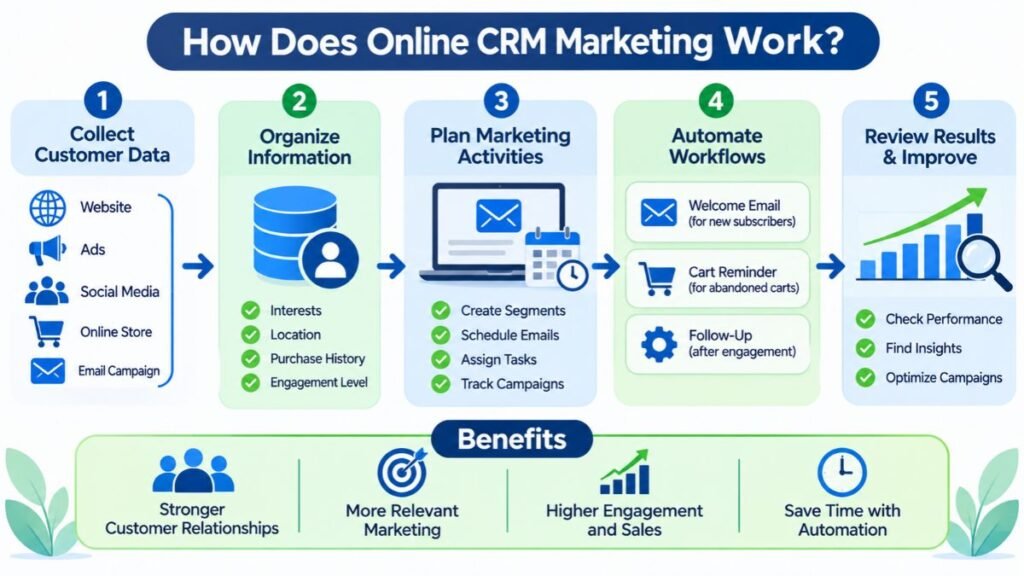
Online CRM marketing works by collecting customer information, organizing it, and using it to guide communication. The process usually begins when someone interacts with a business through a website, advertisement, social media page, online store, or email campaign. The CRM records available details and connects them with an existing customer profile when possible. Marketing teams can then organize contacts according to their interests, location, purchase history, or engagement level. This process is known as Customer data management. Accurate records help businesses understand customer needs and avoid sending irrelevant messages.
After collecting and organizing information, the CRM helps businesses plan and manage marketing activities. A company can create customer segments, schedule email messages, assign follow-up tasks, and monitor campaign performance. Some platforms also support Marketing automation, which allows businesses to trigger actions when customers complete certain activities. For example, a new subscriber might receive a welcome email automatically. A customer who abandons a shopping cart might receive a reminder. These Automated workflows reduce repetitive work and help businesses maintain consistent communication. The team can review the results and improve future campaigns using customer responses and performance data.
A Practical Online CRM Marketing Workflow
Consider a US-based software company that offers project management software. A visitor discovers its website through a Google search and downloads a free project planning template. The website form collects the visitor’s name, email address, and business role. The CRM saves this information and records the original lead source. The marketing team can then identify the visitor as someone interested in project management rather than sending general promotional messages.
The company may send a helpful email explaining project planning methods. If the visitor clicks a product demonstration link, the CRM can record that activity and update the contact’s engagement history. A sales representative can receive a notification when the lead shows strong buying interest. The representative then follows up with relevant information. This connected process makes the experience more organized for both the business and the potential customer.
| Stage | CRM marketing activity | Expected outcome |
| Lead capture | Collect details through website forms | New contact record |
| Data organization | Add source, interests, and customer details | Organized customer information |
| Segmentation | Group contacts by needs and behavior | More relevant communication |
| Lead nurturing | Send helpful emails and resources | Stronger engagement |
| Sales handoff | Notify the sales team about qualified leads | Better follow-up |
| Performance tracking | Review conversions and campaign results | Improved marketing decisions |
Why Is Online CRM Marketing Important for Businesses?
Customers expect businesses to understand their needs and communicate clearly. However, customer information often becomes scattered across email platforms, spreadsheets, website forms, and sales applications. This makes it difficult for teams to understand the full relationship. Online CRM marketing solves this problem by connecting important customer records and communication history. A shared system helps marketing and sales teams work with consistent information. It also improves Marketing and sales alignment because both teams can understand how a lead discovered the business, what content they viewed, and what actions they completed.
Online CRM marketing is also important because acquiring a new customer is only one part of business growth. Businesses must continue providing value after the first purchase. A CRM helps teams understand customer preferences, identify inactive contacts, and communicate with existing buyers. These activities can improve Customer retention and support long-term Business growth. Companies can also use campaign reports to understand which channels generate valuable leads. Instead of spending money based on assumptions, marketers can use actual customer activity to guide decisions. This improves planning and makes marketing efforts easier to measure.
The Role of Customer Information in Marketing Decisions
Customer information becomes more useful when businesses organize it properly. A CRM can show which products customers purchase, how frequently they interact with emails, and which support issues they report. These details help marketers understand common interests and identify changes in customer behavior. For example, an online retailer may discover that customers who purchase home office furniture often return for desk accessories. The marketing team can use this pattern to create relevant product recommendations.
Good customer records also help businesses avoid unnecessary communication. A customer who recently purchased a product may not need another advertisement for the same item. Instead, the business could share setup instructions, product care advice, or information about complementary products. These thoughtful interactions can improve trust and create a more useful relationship over time.
Key Features of Online CRM Marketing Software
Online CRM marketing software combines customer records with tools that support marketing, communication, and reporting. One important feature is contact management, which helps businesses store names, email addresses, phone numbers, company details, and communication history. Customer segmentation allows marketers to organize contacts according to shared characteristics or behavior. Campaign management helps teams plan, schedule, and measure promotional activities. Many platforms also include website forms, email templates, landing pages, reporting dashboards, and task management. Together, these features make Customer relationship management tools useful for businesses that want to organize marketing activities and improve customer communication.
Another important feature is integration with other business applications. A CRM may connect with email marketing software, ecommerce platforms, advertising accounts, customer support systems, and analytics tools. These Third-party integrations help information move between different applications. Many businesses also prefer Cloud CRM platforms because employees can access customer records through an internet connection. A Mobile CRM application can provide access to contact details, tasks, and sales information while employees are away from the office. More advanced systems may include artificial intelligence, reporting recommendations, and automated processes that reduce manual work.
| CRM feature | What it does | Why it matters |
| Contact management | Stores customer and prospect details | Keeps records organized |
| Customer segmentation | Groups contacts by shared characteristics | Supports targeted campaigns |
| Campaign management | Plans and tracks marketing activities | Measures campaign performance |
| Email marketing | Creates and sends marketing emails | Maintains regular communication |
| Workflow automation | Triggers actions based on customer activity | Reduces repetitive tasks |
| Analytics and reporting | Measures marketing and sales results | Supports better decisions |
| CRM integration | Connects external business applications | Reduces disconnected information |
| Mobile access | Provides CRM features on mobile devices | Supports teams working remotely |
AI and Advanced CRM Features
Modern CRM platforms increasingly include Artificial intelligence to help businesses analyze information and complete routine tasks. An AI-powered CRM may summarize customer conversations, suggest follow-up actions, identify unusual activity, or help employees find information. Some platforms also provide Predictive AI features that estimate lead quality or identify customers who may need attention. These capabilities can support faster decisions, but their usefulness depends on data quality and proper configuration.
Some systems are also introducing Agentic CRM capabilities. These systems use AI agents to complete defined tasks across connected business processes. For example, an agent might summarize a customer interaction, recommend a next step, or prepare a campaign draft for review. Generative AI can also help marketers create email drafts, subject lines, and campaign ideas. However, human review remains important. Businesses should check generated information for accuracy, relevance, tone, and compliance before sending it to customers.
Benefits of Online CRM Marketing
One major benefit of online CRM marketing is improved customer understanding. When businesses organize customer records and interaction history, they can identify common interests and communication preferences. This makes it easier to create relevant campaigns instead of sending identical messages to everyone. Better segmentation can also improve Customer engagement because customers receive information that matches their needs. For example, a fitness retailer can create separate campaigns for customers interested in running, strength training, and outdoor activities. Each group receives more relevant recommendations, which can improve the usefulness of marketing communication.
Another benefit is improved efficiency across marketing and sales teams. CRM platforms can automate routine tasks, organize follow-ups, and provide a shared view of customer activity. This helps employees spend less time searching for information and more time supporting customers. Businesses can also measure campaign results and identify opportunities to improve spending. Better targeting and consistent follow-up may increase Marketing ROI over time. A stronger relationship can also improve Customer lifetime value, which represents the total value a business receives from a customer throughout the relationship. These benefits depend on the quality of the strategy, customer data, and ongoing campaign management.
How CRM Marketing Improves Business Performance
CRM marketing can improve business performance by connecting marketing activity with measurable outcomes. A company can compare the number of leads generated by different campaigns, the percentage of leads that become customers, and the revenue associated with each channel. These measurements help marketers understand where their budget is producing results. They can also identify campaigns that generate many leads but few actual purchases. This distinction matters because a large contact list does not always represent strong business performance.
Customer information can also help businesses improve the experience after a purchase. A company might identify customers who have not used a product recently and send them a helpful guide. Another business might notice repeated support requests about the same feature and create an educational email. These actions can reduce confusion and encourage customers to remain engaged. Over time, better communication can support retention, referrals, and repeat purchases.
Online CRM Marketing Strategies to Grow Your Business
A successful CRM strategy begins with understanding the audience. Businesses should identify their main customer groups, common problems, buying preferences, and reasons for choosing a product. They can then use Customer segmentation to organize contacts into meaningful groups. Segments may be based on location, industry, purchase history, engagement, or product interests. For example, a B2B software company might separate small business owners from enterprise decision-makers. Each group may need different information before making a purchase. Relevant communication helps businesses build trust and avoid overwhelming contacts with messages that do not match their interests.
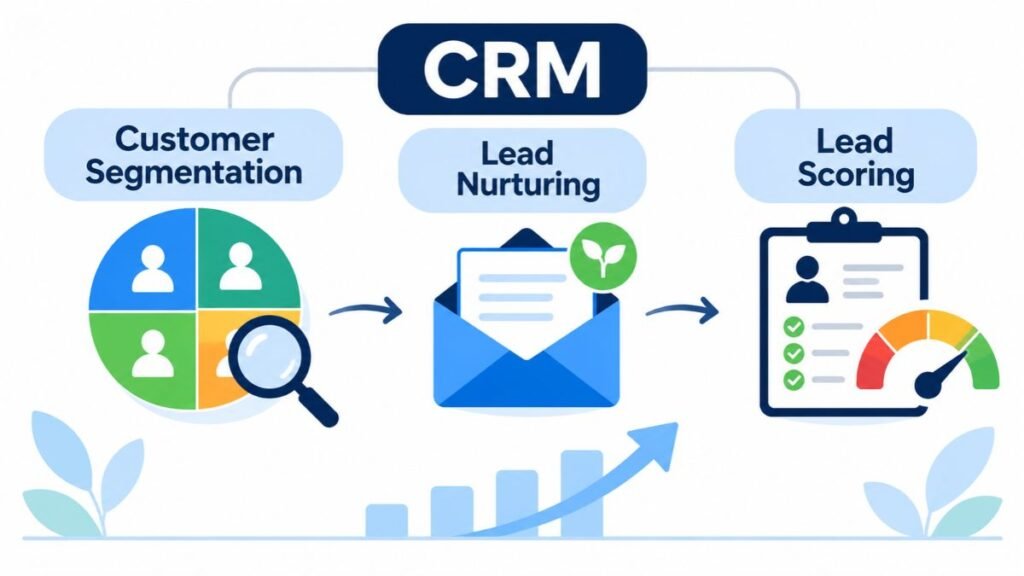
Another useful strategy is Lead nurturing, which means building interest through helpful communication over time. Not every visitor is ready to purchase immediately. Some people need product comparisons, educational resources, demonstrations, or answers to common questions. A CRM can help businesses plan these interactions and track responses. Lead scoring can also help teams identify contacts who show stronger buying signals. A business might assign scores based on website visits, email clicks, form submissions, and product demonstrations. These scores should support human judgment rather than replace it. When used carefully, they help sales teams prioritize follow-ups and improve the overall customer journey.
Personalization and Customer Segmentation
Personalization means using relevant customer information to make communication more useful. It can include using a customer’s name, recommending related products, or sharing content based on previous interests. More advanced personalized customer interactions use customer behavior and preferences to shape the timing and content of messages. However, personalization should feel helpful rather than intrusive. Businesses should avoid collecting unnecessary information or making assumptions that customers have not supported through their actions.
Segmentation makes personalization easier to manage. A business can create groups for new subscribers, first-time buyers, repeat customers, inactive contacts, and high-value accounts. Each group can receive different messages based on its relationship with the company. A new subscriber might receive an introduction to the brand, while a repeat customer could receive information about loyalty benefits. This approach helps businesses communicate with greater relevance while maintaining a consistent brand voice.
Improving Lead Nurturing and Follow-Ups
Lead nurturing should provide useful information at each stage of the buying process. A person researching a problem may need educational articles, while someone comparing products may prefer feature explanations or case studies. A CRM can help marketers organize these resources and deliver them at suitable moments. It can also notify sales representatives when a contact requests a demonstration or visits an important product page.
Follow-ups should be based on meaningful activity rather than a fixed schedule alone. Sending several messages within a short period can frustrate potential customers. Businesses should consider the customer’s previous response, communication preferences, and stage in the buying process. They should also provide clear ways to manage marketing subscriptions. A thoughtful follow-up process builds trust and makes communication feel more natural.
How to Use Online CRM Marketing for Different Marketing Channels
Online CRM marketing becomes more powerful when businesses connect customer information across different channels. Email is a common starting point because it allows companies to share educational content, product updates, event invitations, and promotional messages. Website forms can capture new contacts and connect them with relevant campaigns. Social media platforms can help businesses understand engagement and bring interested visitors to landing pages. Ecommerce integrations can connect browsing activity and purchases with customer records. These connected Digital marketing campaigns give marketers a clearer view of how people discover and interact with a business.
The goal is not to use every available channel. Businesses should focus on the channels their customers actually use and maintain consistent communication across them. A customer might discover a brand through social media, visit its website, subscribe to an email list, and later contact customer support. A connected CRM can help teams understand these different Customer touchpoints. This supports an Omni channel customer experience, where customers receive consistent information even when they switch between communication channels. The business can also use channel reports to understand which interactions contribute to leads, purchases, and repeat business.
| Marketing channel | CRM marketing application | Example |
| Segmentation, newsletters, and follow-ups | Send product guides to interested subscribers | |
| Website | Lead capture and behavior tracking | Save form submissions as new contacts |
| Social media | Campaign tracking and lead collection | Record leads from social promotions |
| Ecommerce | Purchase history and customer segmentation | Recommend related products |
| SMS | Time-sensitive customer communication | Send delivery or appointment updates |
| Paid advertising | Campaign attribution and audience analysis | Compare leads from different ad campaigns |
| Customer support | Interaction history and issue tracking | Share recurring customer questions with marketing |
Email and Website Marketing
Email marketing works well with CRM because businesses can connect messages with customer records. Marketers can organize subscribers according to interests, previous purchases, or engagement levels. They can also track email delivery, clicks, and conversions when their platform supports those reports. For example, a software company might send a product tutorial to new users and a feature update to existing customers. The content is more useful because it reflects each group’s relationship with the business.
Website marketing provides another important source of customer information. Forms can collect contact details when visitors request a guide, register for a webinar, or ask for a product demonstration. CRM integration can send those details directly into the contact database. Businesses should explain why they collect information and avoid requesting unnecessary details. They should also ensure that tracking and marketing practices follow applicable privacy requirements.
Social Media, Ecommerce, and Paid Advertising
Social media campaigns can introduce a business to new audiences and encourage people to visit its website. When connected with CRM tools, campaign information can help marketers understand which promotions generate leads. Businesses can also organize leads based on the social campaign or landing page that brought them in. This makes it easier to compare campaign performance instead of judging success only by likes or followers.
Ecommerce and advertising integrations provide additional insight into customer behavior. An online store can connect order history with customer records and identify repeat buyers. Advertising data can help marketers compare spending with leads and sales. These insights can guide budget decisions and product recommendations. However, businesses should check that integrations transfer accurate information and respect customer preferences. Not every platform provides the same tracking features, so available capabilities should be checked before choosing a CRM.
CRM Marketing Automation: How Does It Work?
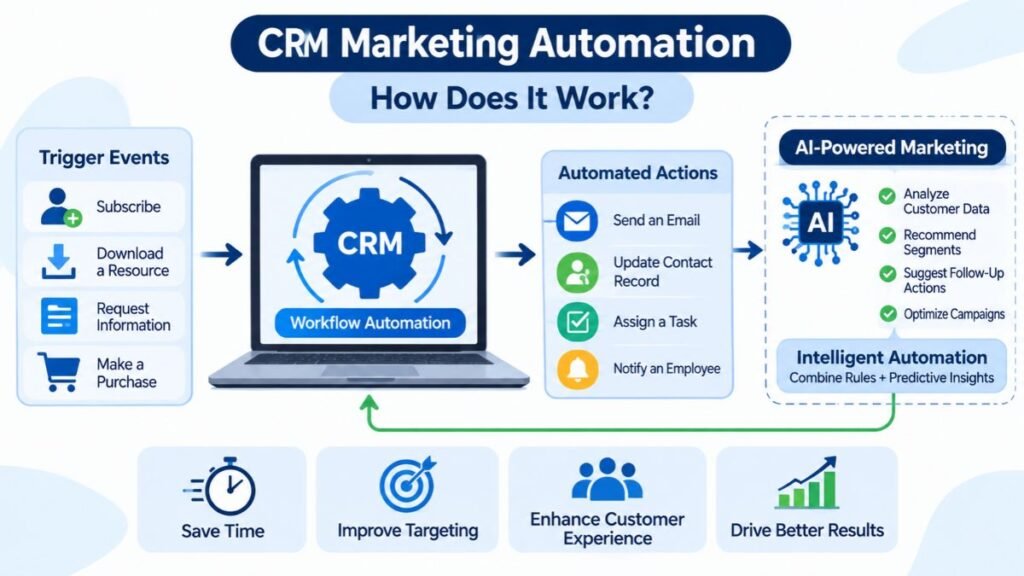
CRM marketing automation uses software rules to complete repetitive marketing tasks when specific conditions are met. A business can create a workflow that starts when someone subscribes, downloads a resource, requests information, or makes a purchase. The CRM then performs a predefined action, such as sending an email, updating a contact record, assigning a task, or notifying an employee. This type of Workflow automation helps businesses respond consistently without requiring someone to complete every step manually. It can also reduce delays when a potential customer shows interest outside normal business hours.
More advanced platforms combine automation with customer behavior and AI-based recommendations. AI automation may help analyze customer records, suggest audience segments, or identify suitable follow-up actions. AI-powered marketing can also support content creation and campaign optimization. Some platforms provide intelligent automation that combines business rules with predictive features. For example, a CRM might identify a lead with strong engagement and recommend that a sales representative contact them. These tools can improve efficiency, but they should be monitored carefully. Incorrect rules can send irrelevant messages or create poor customer experiences.
Common CRM Automation Examples
A welcome email sequence is a simple example of CRM automation. When someone joins a mailing list, the system can send a welcome message and then share useful information over the following days. A lead follow-up workflow can notify a sales representative when a prospect requests a demonstration. An ecommerce business might create a cart reminder for customers who leave products without completing checkout. A service company could send appointment reminders or request feedback after an interaction.
Automation can also support internal processes. A CRM may assign new leads to the correct sales representative based on region or business type. It can create tasks when a customer has not received a response within a defined period. Some systems can summarize customer conversations and recommend next steps. These workflows help teams stay organized, but important customer conversations should still receive human attention.
Measuring Automation Performance
Businesses should measure whether automation improves customer and business outcomes. Useful metrics include email engagement, lead response time, booked demonstrations, completed purchases, and unsubscribe rates. The Campaign conversion rate shows the percentage of people who complete a desired action after interacting with a campaign. A business can compare conversion rates before and after introducing an automated workflow. It should also check whether the workflow creates more qualified leads or simply increases message volume.
Customer feedback matters as much as numerical performance. If people frequently unsubscribe or complain about repeated messages, the automation may be too aggressive. Businesses should review workflow timing, audience selection, and message relevance. They should also test important changes with smaller groups before applying them to their entire database. Regular reviews help automation remain useful as customer needs and business processes change.
Online CRM Marketing vs. Traditional Marketing and Marketing Automation
Traditional marketing often relies on broad communication methods such as print advertisements, television, radio, and general promotional campaigns. These channels can create awareness, but they may provide limited information about individual customer behavior. Online CRM marketing uses digital customer records to connect marketing activity with specific contacts and interactions. It helps businesses understand who engaged with a campaign, what action they took, and how that activity relates to later sales. Traditional marketing can still play an important role, but CRM-supported digital marketing provides more detailed customer information when suitable tracking and measurement are available.
CRM marketing and marketing automation are closely related, but they are not identical. CRM focuses on organizing customer relationships and information. Marketing automation focuses on executing repetitive marketing tasks through software workflows. Online CRM marketing brings these capabilities together by using customer information to guide marketing activities. A business may use a CRM to store contacts and track sales opportunities while using a separate marketing automation platform to manage email sequences. Some modern products combine both functions. The right setup depends on the company’s needs, team size, budget, and existing software.
| Comparison area | Traditional marketing | Online CRM marketing | Marketing automation |
| Main purpose | Reach a broad audience | Manage customer relationships through digital data | Automate repetitive marketing activities |
| Customer information | Often limited or aggregated | Connected to customer records | Uses contact and behavior data |
| Personalization | Usually broad | Based on customer profiles and activity | Based on workflow rules and segments |
| Measurement | Often uses reach and response estimates | Can connect campaigns with customer outcomes | Tracks automated campaign activity |
| Communication | Print, broadcast, events, and other channels | Digital channels connected with CRM records | Automated email and other supported channels |
| Best use | Awareness and broad reach | Customer understanding and relationship management | Consistent execution at scale |
How CRM Marketing and Marketing Automation Work Together
A CRM can store customer details and show the history of interactions with a business. Marketing automation can use those records to send relevant messages or trigger follow-up tasks. For example, a CRM may identify a customer who purchased a product six months ago. An automation workflow can then send a product care guide or a reminder about a related product. The CRM provides the customer context, while automation performs the scheduled action.
This combination can create a more connected marketing process. However, businesses should not assume that every CRM includes every automation feature. Some platforms offer basic email sequences, while others provide advanced customer journeys, advertising integrations, and AI-assisted workflows. Before choosing a system, teams should identify which activities they need to manage directly and which functions may require additional software.
How to Choose the Best Online CRM Marketing Software
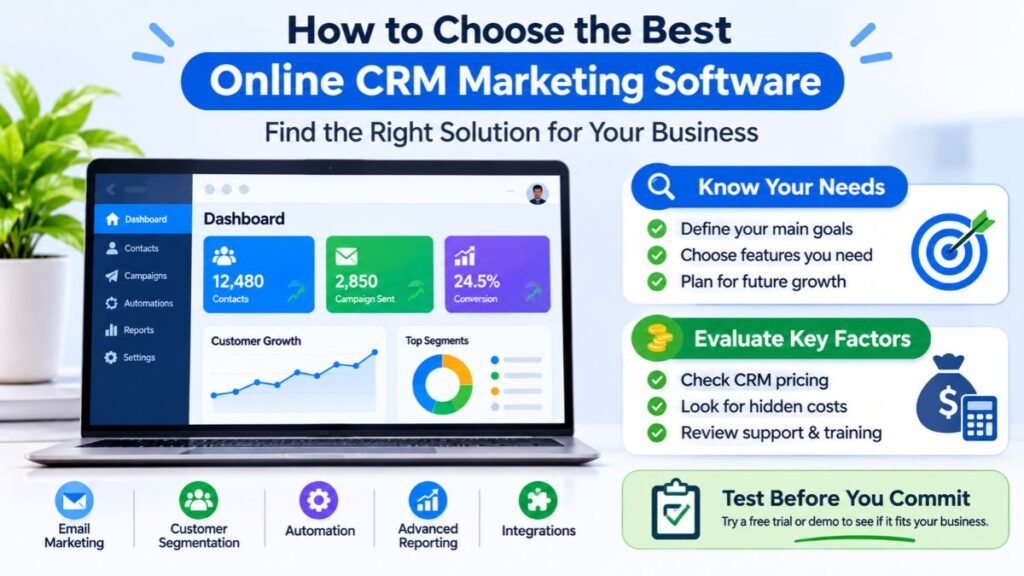
Choosing online CRM marketing software requires more than comparing feature lists. Businesses should first identify their main problems and decide what they want the system to improve. A small company may need contact management, email campaigns, and basic automation. A growing ecommerce business may need purchase tracking, customer segmentation, and advertising integrations. A large organization may require advanced permissions, detailed reporting, multiple sales pipelines, and complex workflows. The software should match the company’s current processes while leaving room for future growth. It should also be easy enough for employees to use consistently.
Cost is another important consideration. CRM pricing can depend on the number of users, contact records, marketing contacts, email volume, automation features, and available integrations. A low starting price does not always mean a lower total cost. Some platforms charge extra for advanced reporting or additional marketing capabilities. Businesses should also consider setup time, employee training, data migration, and ongoing support. A practical evaluation should include a trial or product demonstration whenever possible. Testing the software with real business tasks can reveal whether its interface and features fit the team’s daily work.
| Selection factor | What to evaluate | Why it matters |
| Ease of use | Navigation, dashboards, and learning curve | Helps employees adopt the platform |
| Marketing features | Email, segmentation, forms, and campaign tools | Supports everyday marketing activities |
| Automation | Triggers, workflows, and follow-up rules | Reduces repetitive tasks |
| Integrations | Ecommerce, email, advertising, and support apps | Connects existing systems |
| Reporting | Campaign, lead, and revenue reports | Measures business results |
| Security | Access controls, authentication, and data protection | Helps protect customer information |
| Scalability | Contact limits, users, and upgrade options | Supports future business needs |
| Total cost | Subscriptions, add-ons, setup, and training | Prevents unexpected expenses |
Data Security, Privacy, and CRM Implementation
A CRM stores information that customers expect businesses to handle responsibly. Companies should review access controls, authentication options, backup practices, data retention settings, and vendor security documentation. Data security protects customer records from unauthorized access, while Data privacy concerns how personal information is collected, used, shared, and retained. Businesses should collect only information they genuinely need and limit access to employees who require it. The National Institute of Standards and Technology provides a practical starting point for smaller organizations in its Small Enterprise Risk Management Framework guide.
US businesses should also understand the laws that apply to their marketing activities. The Federal Trade Commission explains that the CAN-SPAM Act covers commercial email and requires accurate sender information, non-deceptive subject lines, a valid physical postal address, and a clear way to opt out. Businesses must honor opt-out requests within the required period. California’s privacy rules also give qualifying consumers rights concerning personal information, including rights to know, delete, and opt out of certain data sharing. Requirements can vary by business and jurisdiction, so companies should review the FTC’s CAN-SPAM compliance guide and the California Consumer Privacy Act guidance. This information is educational, not legal advice.
A Practical CRM Implementation Process
A successful CRM implementation starts with clear goals and clean data. Businesses should decide which customer information they need, which teams will use the platform, and which existing applications must connect with it. Before importing records, they should remove duplicates, correct outdated details, and standardize important fields. Poor data quality can create inaccurate reports and irrelevant campaigns. A business should also define how leads move between marketing and sales so employees follow a consistent process.
After setup, the team should test the system with a small group of records and a few real workflows. Employees need training on contact updates, campaign management, task assignments, and data protection. Managers should review adoption and performance during the first few months. They can then adjust fields, workflows, and reports based on actual usage. A CRM should develop with the business rather than remain a one-time software installation.
Best Online CRM Marketing Tools for Businesses
Several CRM platforms support online marketing, customer management, and automation. However, they are designed for different business needs. Some focus on contact management and sales pipelines, while others provide broader marketing capabilities. HubSpot CRM is known for connecting contact records with marketing and sales activities. Salesforce provides a wider ecosystem for organizations with more complex customer processes. Zoho CRM includes campaign management, segmentation, and automation features. monday CRM offers visual sales and work management, while Pipedrive focuses strongly on sales pipeline organization. Businesses should compare current plans because features, limits, and prices can change.
The best choice depends on how a company works and which marketing activities it wants to manage. A small business may prefer a platform that is simple to configure and easy to maintain. A company with multiple departments may need advanced permissions, reporting, and integrations. Some businesses may also use a dedicated email marketing platform alongside their CRM. The important point is to select tools that work together without creating unnecessary complexity. A connected system should make customer information easier to use, not add more disconnected applications.
| CRM platform | Main strengths | Suitable business needs |
| HubSpot CRM | Contact management, marketing and sales tools, connected customer records | Businesses looking for connected CRM and marketing features |
| Salesforce | Broad CRM ecosystem, advanced customization, marketing and sales capabilities | Organizations with complex processes and larger teams |
| Zoho CRM | Lead management, campaign tools, segmentation, automation, and AI features | Small and growing businesses seeking a flexible CRM |
| monday CRM | Visual workflows, pipeline tracking, and team collaboration | Teams that prefer visual project and sales management |
| Pipedrive | Sales pipeline management, deal tracking, and sales activity organization | Sales-focused teams that need a clear view of opportunities |
HubSpot CRM
HubSpot CRM connects contact records with sales and marketing activities. Businesses can use it to organize contacts, track interactions, manage deals, and connect customer information with other HubSpot products. Its broader ecosystem includes marketing tools for forms, email campaigns, landing pages, and automation. This can be useful for businesses that want customer and campaign information connected in one environment. However, available features depend on the product and subscription level. Businesses should review current plan limits before relying on a specific feature.
Salesforce
Salesforce provides a broad CRM platform for businesses that need connected customer information across sales, marketing, service, and commerce. Its marketing products support customer journeys, campaign management, and cross-channel communication. Salesforce can be suitable for organizations with complex processes and dedicated teams. However, its range of features may require more planning, administration, and training than a small business needs. Companies should compare implementation requirements and total costs before selecting a plan. Its marketing automation overview explains its available marketing capabilities.
Zoho CRM
Zoho CRM combines contact management, lead management, sales processes, and marketing features. Its marketing capabilities include segmentation, email campaigns, web forms, and campaign analysis. The platform also provides automation and AI-based features, although availability can vary by edition. Zoho may suit small and growing businesses that want several business applications within one ecosystem. Companies should review its marketing automation features and check whether the required functions are included in their preferred plan.
monday CRM
monday CRM uses a visual workspace to help teams organize sales activities, customer records, and workflows. Businesses can create boards, track deals, assign tasks, and manage sales processes. Its visual structure may appeal to teams that already use monday.com for project management. Marketing teams should check whether its available features meet their campaign requirements or whether they need additional marketing software. It is important to evaluate the full workflow rather than selecting a CRM based only on its interface.
Pipedrive
Pipedrive focuses on sales pipeline management and helps teams track deals through different stages. Users can organize contacts, schedule activities, monitor opportunities, and understand which deals need attention. It can be useful for businesses that want a clear sales process and consistent follow-up. However, companies that need advanced marketing campaigns may need to connect Pipedrive with additional tools. Before choosing it, businesses should compare its automation, reporting, and integration options with their marketing requirements.
Frequently Asked Questions
What are the top 3 CRM platforms?
HubSpot CRM, Salesforce, and Zoho CRM are three widely used platforms for managing customer relationships and sales activities.
Will CRM be replaced by AI?
No, AI is more likely to enhance CRM by automating tasks, analyzing customer data, and improving customer interactions.
Which CRM is best for beginners?
HubSpot CRM is a beginner-friendly option because of its simple interface and free starting plan.
Is CRM easy to learn?
Yes, basic CRM features are easy to learn. Advanced automation and reporting may require additional practice.
Can I learn CRM for free?
Yes, you can learn CRM for free through HubSpot Academy, Zoho tutorials, and Salesforce Trailhead.
Conclusion
Online CRM marketing helps businesses connect customer information with practical marketing activities. It gives teams a clearer view of customer interactions, campaign performance, and opportunities for stronger relationships. With the right system, businesses can organize leads, create relevant customer segments, automate routine tasks, and measure marketing results. These capabilities can support better customer experiences and more informed business decisions.
However, software alone does not create an effective marketing strategy. Businesses need accurate data, useful content, thoughtful communication, and regular performance reviews. They should also protect customer information and follow applicable marketing and privacy requirements. Start with the features your team genuinely needs, build a simple process, and improve it as your business grows. A well-managed CRM can become an important part of a sustainable online marketing strategy.