10 Best n8n Alternatives for AI and Workflow Automation in 2026
Finding the right n8n alternatives can make workflow automation easier, faster, and more affordable. Although n8n offers flexibility and powerful customization, its technical setup may not suit every user. Some businesses need simple app connections, while others want advanced AI agents or better control over their data. Fortunately, several workflow automation tools offer different features for beginners, developers, and growing companies.
Platforms like Make, Zapier, and Active pieces simplify everyday tasks, while specialized solutions support AI workflow automation and complex integrations. This guide explores the 10 best options in 2026, comparing their features, pricing, and capabilities to help you choose the right automation software for your needs.
Why Are People Looking for n8n Alternatives?
n8n alternatives attracts users who want flexible automation without building every integration from scratch. Its visual editor supports complex workflows, custom code, and AI connections. However, flexibility can also create extra work. Beginners may find expressions, credentials, nodes, and execution settings difficult to understand.
Businesses also have different requirements. A small company may prefer simple no-code automation, while developers need advanced API automation. Some teams want managed cloud automation instead of maintaining servers. Others need stronger governance, specialized AI features, or predictable operating costs. These differences explain why people compare n8n competitors before choosing an automation platform.
n8n’s Learning Curve Can Be Challenging for Beginners
n8n uses nodes to represent individual workflow steps. Users connect triggers, actions, and conditions to build automated processes. This approach offers control, but beginners must understand data mapping, expressions, credentials, and error handling. Platforms such as Zapier often feel easier for straightforward tasks.
Self-Hosting Requires Technical Knowledge
Self-hosting gives users more control over infrastructure and data. However, it also makes them responsible for servers, updates, backups, security, and monitoring. A managed platform handles much of this work. Teams without technical support may prefer hosted workflow automation tools.
Integration Requirements Differ Between Businesses
Every business uses a different combination of applications. One company might depend on Salesforce and Slack, while another uses Microsoft 365 and Google Workspace. Automation platforms vary in their connectors and custom API support. Missing integrations can force teams to build extra connections using web hooks or code.
Pricing and Workflow Execution Costs
Automation platforms calculate usage differently. Some charge for tasks, while others use operations, credits, or complete workflow executions. These differences can make direct price comparisons misleading. A workflow with ten steps might cost more on one platform but count as one execution elsewhere.
Some Teams Need More Advanced AI Automation
Traditional automation follows rules that users define. AI automation can interpret text, summarize information, classify requests, and choose actions. Teams exploring AI agents may therefore prefer specialized AI agent platforms. These systems can support more flexible AI workflow automation than basic trigger-and-action tools.
What Makes a Good n8n Alternative?
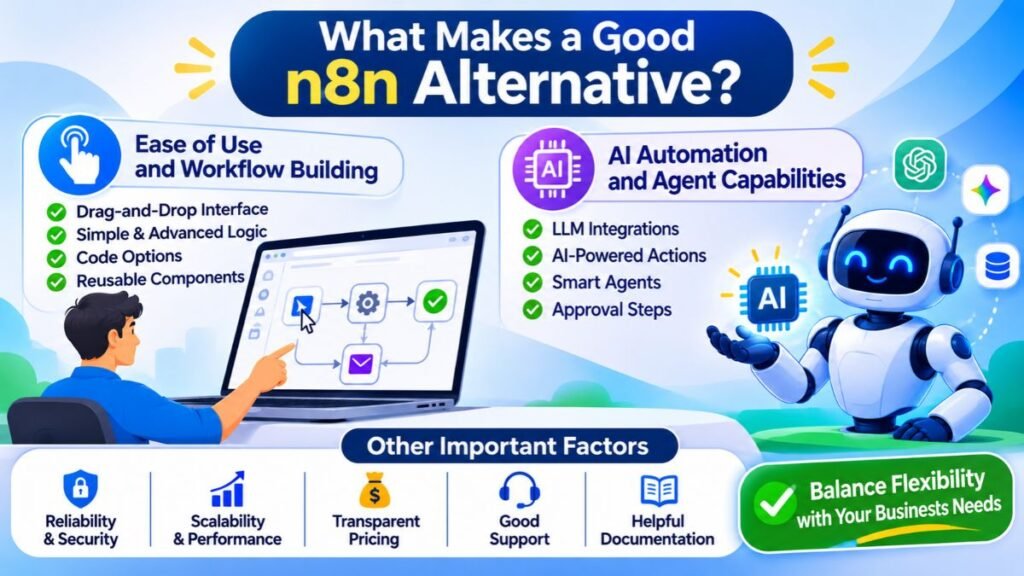
A good n8n alternative should solve the problem that makes someone consider switching. It should connect the required applications, handle expected workloads, and fit the team’s technical skills. The strongest automation platforms also provide reliable monitoring, clear pricing, and useful documentation.
AI features matter, but they should not distract from basic reliability. A platform may offer impressive agents yet struggle with everyday integrations. Compare its workflow controls, security, support, and scaling costs before making a decision. The best choice balances flexibility with practical business process automation needs.
Ease of Use and Workflow Building
A clear workflow builder helps users understand how information moves between applications. A drag-and-drop interface can make simple automation easier to create and maintain. However, advanced users may also need code steps, reusable components, and detailed conditional logic.
AI Automation and Agent Capabilities
Modern platforms increasingly support large language models, AI actions, and agent-based workflows. These features can classify leads, summarize documents, and answer customer questions. Strong LLM integrations let teams connect models to business data. Good platforms also provide approval steps when AI actions affect customers or important records.
App Integrations and API Support
Native connectors reduce setup time, but they cannot cover every business system. Reliable platforms also support REST APIs, authentication, and API keys. Third-party integrations and custom requests help connect less common applications. Strong webhooks support real-time events without constant polling.
Pricing, Free Plans, and Usage Limits
A useful comparison must examine the complete billing model. Check the number of tasks, executions, operations, or automation credits included. Also review user limits, scheduling frequency, and premium features. A low starting price may become expensive when workflows run frequently.
Self-Hosting, Security, and Data Control
Some organizations need self-hosting because of internal policies or data requirements. Others prefer cloud hosting to reduce maintenance. Evaluate encryption, access permissions, retention settings, and data privacy controls. Larger teams may also need role-based access control and audit logs.
Scalability, Reliability, and Workflow Monitoring
Production workflows need more than a successful first run. They require retries, error notifications, execution history, and clear logs. Teams should understand how the platform handles failed steps and duplicate events. These features become especially important as enterprise automation expands across departments.
Best n8n Alternatives in 2026
The following platforms address different automation needs. Some focus on visual integrations, while others specialize in AI agents, custom code, or enterprise systems. This list includes both direct competitors and platforms that can replace n8n for particular workflows.
The ranking is an editorial shortlist, not a universal performance score. Product capabilities, pricing, and free-plan limits can change. Always test important workflows before moving business processes. A platform that suits a marketing team may not suit developers or enterprise technical teams.
1. Make — Best n8n Alternative for Visual Workflow Automation
Make is a strong choice for users who prefer visual automation. Its scenario builder displays how information moves between connected applications. Users can add routers, filters, and actions without writing code for every step. This makes it useful for marketing, operations, and everyday integrations.
Make supports thousands of app connections and provides tools for more advanced scenarios. Its free plan includes up to 1,000 credits monthly, while its Core plan is listed at $12 monthly for 10,000 credits. Higher plans add features for teams and advanced automation.
2. Zapier — Best n8n Alternative for No-Code App Integrations
Zapier is popular with people who want to connect applications quickly. Its automation workflows are called Zaps. Each Zap starts with a trigger and performs one or more actions. This structure makes common tasks easy to understand, especially for beginners.
Zapier supports a broad app ecosystem and now includes AI-related capabilities. Its published Free plan includes 100 tasks monthly and supports basic two-step Zaps. Paid pricing depends on task volume and selected features. Teams should check task usage carefully because each billable action can affect monthly costs.
3. Activepieces — Best Open-Source Alternative to n8n
Activepieces is worth considering when open-source flexibility matters. It offers a visual automation environment, AI features, and connections to business applications. Its platform supports both hosted and self-managed deployment options. This makes it relevant to teams that want control without giving up a visual interface.
Activepieces publishes a free plan with 1,000 monthly credits and unlimited flows. Its paid plans add higher credit allowances and team features. The company also describes self-hosted and on-premises options. Check the current licensing and feature differences before choosing its Community Edition or a managed plan.
4. Gumloop — Best n8n Alternative for AI-Powered Workflows
Gumloop focuses on building workflows around AI tasks. Users can combine models, data sources, and automation steps in a visual environment. This makes it useful for research, document processing, lead enrichment, and other tasks involving unstructured information. It is especially relevant to teams exploring AI-native automation.
Gumloop’s published Pro pricing starts at $37 monthly and includes 20,000 credits. Its pricing page also lists unlimited agents and access to more than 35 models. Enterprise options add controls such as advanced security and governance. Review credit consumption before estimating the cost of frequent AI workflows.
5. Pipedream — Best n8n Alternative for Developers and API Automation
Pipedream suits developers who need direct access to APIs and code. It combines prebuilt integrations with custom programming steps. This approach works well when a workflow needs special data processing or application logic. It can also support event-driven automation and developer-focused integrations.
Pipedream is less focused on beginner-friendly visual building than some n8n alternatives. Its pricing and usage model include different considerations for development, production, and connected users. Developers should review compute usage and production requirements before deploying customer-facing workflows. It is a strong option when code flexibility matters more than a fully no-code experience.
6. Microsoft Power Automate — Best n8n Alternative for Microsoft Users
Microsoft Power Automate is a natural option for organizations already using Microsoft products. It connects cloud applications and supports desktop automation. Businesses can automate approvals, document handling, data entry, and repetitive tasks across Microsoft 365. Its connection with the wider Power Platform also supports more advanced business processes.
Microsoft lists a free trial and a Premium plan priced at $15 per user monthly when billed yearly in the US. Process and Hosted Process licenses serve different automation needs. Licensing can become complex when organizations combine cloud flows, desktop flows, and unattended automation. Check the official plan details before estimating total costs.
7. Workato — Best n8n Alternative for Enterprise Automation
Workato is designed for organizations that need automation across many business systems. It connects applications and coordinates processes across departments. Its recipe-based approach helps teams build repeatable integrations for finance, sales, HR, and customer operations. This makes it more relevant to larger organizations than casual personal automation.
Workato focuses on enterprise requirements such as governance, integration management, and controlled access. Pricing is generally quote-based, so businesses should discuss expected usage and required capabilities with its sales team. It may be more than a small company needs. However, complex environments may benefit from its enterprise-focused approach.
8. Tray.ai — Best n8n Alternative for Complex Business Integrations
Tray.ai provides an integration platform for connecting applications and orchestrating business workflows. It is designed for teams managing complex integrations across multiple systems. Its platform also covers AI agents and MCP-related workflows. This makes it relevant to businesses combining application integration with newer AI processes.
Tray.ai publishes usage-based pricing with plans sized to each customer’s needs. Its pricing page lists different workspace, insight, and log-retention allowances. Enterprise options include advanced hosting and security features. Since pricing depends on usage and configuration, request a quote based on real workflow volumes.
9. Node-RED — Best Open-Source n8n Alternative for Custom Automation
Node-RED is a flow-based programming tool for connecting devices, APIs, and services. Its visual editor uses connected nodes to represent processes. Developers can use it for IoT projects, event handling, data movement, and custom integrations. It is especially useful when automation involves hardware or local systems.
Node-RED is open source and can run on user-managed infrastructure. It offers flexibility, but users may need more technical knowledge than with beginner-focused platforms. Its ecosystem and flow-based design make it a practical option for developers. It is not necessarily the easiest choice for marketing teams seeking ready-made business workflows.
10. Lindy AI — Best n8n Alternative for AI Assistants and Agents
Lindy AI focuses on AI assistants that can handle tasks across connected applications. Users can create assistants for email, scheduling, research, and other repetitive work. This makes it different from traditional workflow tools that mainly follow fixed triggers and actions. It is useful for people exploring AI-driven task delegation.
Lindy’s pricing page currently lists a free starting allowance of $50 in credits. Its paid plans use monthly credits, with pricing changing according to the selected allowance. Users should estimate how many actions their assistants will perform before choosing a plan. Human approval options are also important when agents can send messages or update records.
n8n Alternatives Compared: Features, Pricing, and Integrations
Comparing tools side by side makes the differences easier to understand. Make and Zapier focus on accessible app automation, while Pipedream offers more developer control. Activepieces and Node-RED appeal to users interested in open-source options. Gumloop and Lindy AI focus more heavily on AI-driven work.
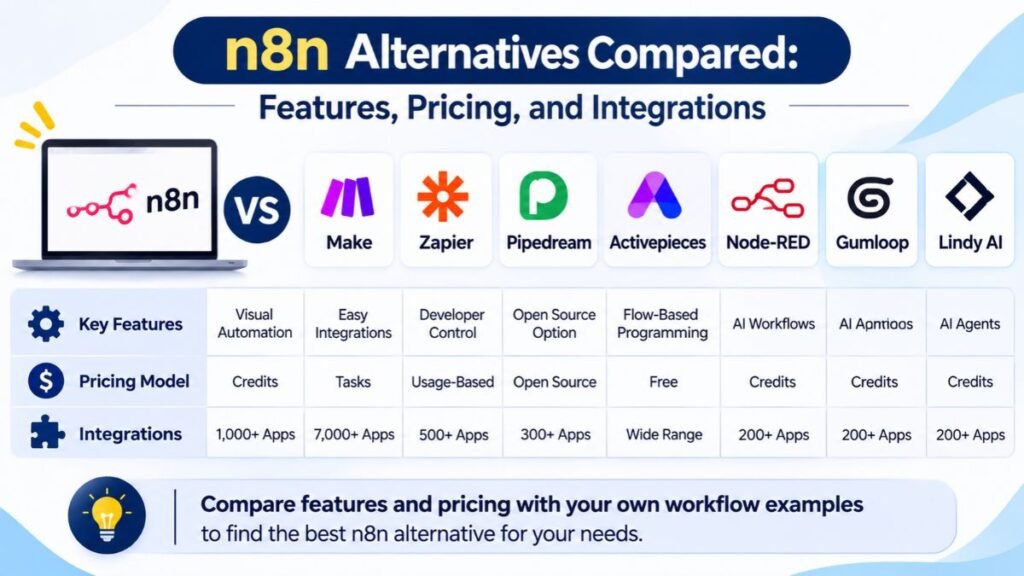
Pricing also requires careful attention. Make uses credits, Zapier uses tasks, and n8n counts complete workflow executions. Gumloop and Lindy AI use credit-based allowances. These models measure different activities, so compare them using your own workflow examples rather than starting prices alone.
n8n Alternatives Comparison Table
| Platform | Best for | AI capabilities | Deployment | Pricing approach |
| Make | Visual automation | AI integrations and workflows | Cloud | Credits |
| Zapier | No-code integrations | AI tools and agents | Cloud | Tasks and plan limits |
| Activepieces | Open-source automation | AI flows and agents | Cloud or self-hosted options | Credits and custom plans |
| Gumloop | AI-powered workflows | AI models and agents | Cloud | Credits |
| Pipedream | Developer workflows | AI and API integrations | Cloud | Usage-based |
| Microsoft Power Automate | Microsoft automation | AI Builder and Copilot-related features | Cloud and desktop | User or bot licenses |
| Workato | Enterprise integration | Enterprise AI automation | Enterprise platform | Custom quote |
| Tray.ai | Complex integrations | AI agents and orchestration | Cloud and enterprise options | Usage-based quote |
| Node-RED | Custom and IoT workflows | Custom integrations | Self-hosted | Open-source software |
| Lindy AI | AI assistants | AI agents and task handling | Cloud | Credits |
Which n8n Alternative Has the Best AI Features?
The strongest AI choice depends on the work you want to automate. Gumloop suits workflows that process information using different models. Lindy AI focuses on assistants that perform practical tasks across connected applications. Activepieces combines automation with agents, while Zapier adds AI features to its broader integration ecosystem.
Other platforms deserve attention for specialized needs. Relevance AI focuses on building AI agents and agent teams for business tasks. Stack AI provides a visual environment for creating AI applications and workflows. These platforms may fit AI-heavy projects better than general-purpose automation tools, depending on the required integrations and controls.
Which n8n Alternative Offers the Most Integrations?
Zapier is well known for its broad application ecosystem. Make also supports thousands of applications and provides visual tools for connecting them. Workato and Tray.ai focus on business integration across larger organizations. Their value depends on the systems a company needs to connect, not simply the total connector count.
Specialized n8n alternatives can also fill integration gaps. Integrately focuses on connecting business applications through ready-made automation recipes. IFTTT is often used for simple personal and smart-device automations. For uncommon systems, check support for custom APIs, authentication, and MCP servers before choosing a platform.
Which n8n Alternative Offers the Best Value for Money?
Make can be attractive for users who want a visual builder and a published entry-level plan. Activepieces offers a free tier and paid credit allowances. Zapier provides a free plan, but its task limits may affect users with frequent multi-step workflows. Value depends on actual usage, not just subscription price.
AI platforms need a separate cost calculation. Each model request, agent action, or processed document may consume credits. A workflow that looks inexpensive during testing can become costly at scale. Estimate monthly runs, average steps, model usage, and retries before comparing pricing plans.
Which n8n Alternatives Support Self-Hosting?
Self-hosting matters when organizations need infrastructure control or must meet internal data requirements. Activepieces provides cloud and on-premises options, while Node-RED is commonly deployed on user-managed systems. n8n also offers a self-hosted Community Edition. These choices require someone to manage updates, backups, access, and security.
Many commercial platforms focus primarily on managed cloud environments. That approach reduces infrastructure work, but it gives users less control over deployment. Check whether the vendor supports private networking, regional hosting, or on-premises connectivity. Also review data retention and access controls before moving sensitive business information.
Free and Open-Source Alternatives to n8n
Free and open-source software can reduce subscription costs, but the terms mean different things. A free cloud plan may restrict monthly tasks, users, or features. Open-source software provides access to source code under a license. Self-hosting can remove platform subscription fees, but infrastructure and maintenance still cost money.
For users comparing open-source automation tools, Activepieces and Node-RED are worth exploring. They serve different audiences, however. Activepieces offers a more business-oriented automation experience, while Node-RED is particularly flexible for custom and device-based projects. Choose according to your technical skills and workflow requirements.
Best Free Alternatives to n8n
Activepieces offers a free cloud plan with monthly credits and unlimited flows. Make provides up to 1,000 monthly credits on its free plan. Zapier includes 100 tasks per month on its free tier. These allowances can help users test basic workflows before paying for higher usage.
A free plan is useful for learning and small experiments. It may not support a busy production environment. Check the limits on scheduled runs, users, execution history, and premium connectors. Also confirm whether the free tier permits the specific workflow you intend to deploy.
Best Open-Source Alternatives to n8n
Activepieces and Node-RED are relevant choices for users seeking open-source n8n alternatives. Their interfaces and target audiences differ. Activepieces focuses on business workflows and AI-related automation. Node-RED offers a flow-based environment that developers can adapt to devices, APIs, and custom systems.
Always review the current open-source license before using software commercially. An MIT license generally permits broad use, modification, and distribution, subject to its conditions. However, do not assume every feature or edition of a product uses the same license. Check the project’s official repository and licensing terms.
Can You Self-Host n8n Alternatives?
Self-hosting means running automation software on infrastructure you manage. That infrastructure might be a private server, cloud virtual machine, or local device. Users gain more control over deployment and data location. They also become responsible for operating the environment and keeping it secure.
A self-hosted setup needs reliable backups, monitoring, access management, and updates. It may also require database maintenance and server capacity planning. Activepieces, Node-RED, and n8n are options worth investigating. Compare their deployment documentation and licensing before selecting one for production.
Is a Free n8n Alternative Enough for Business Automation?
A free n8n alternatives can handle simple internal tasks. For example, a small team might send form submissions to a spreadsheet and receive notifications. Such workflows may run within free usage limits. However, customer-facing processes often need stronger monitoring, support, and predictable availability.
Growing businesses should calculate the cost of failure as well as subscription fees. A missed lead or failed invoice process can create more expense than a paid plan. Review execution history, error alerts, permissions, and support options. Upgrade when the workflow becomes important to daily operations.
Best n8n Alternatives for Different Use Cases
There is no single platform that wins every automation category. A small business may value simplicity, while a developer may prioritize code and API access. Enterprise teams often need governance, monitoring, and secure connections. Matching the platform to the use case produces better results than choosing by popularity.
Think about the task before comparing brands. Marketing teams may need lead routing and campaign updates. Support teams may need ticket classification and response assistance. Developers may need event-driven workflows. The following comparisons connect common business requirements with suitable automation software.
Best n8n Alternative for Small Businesses
Small businesses often need practical automation without a dedicated engineering team. Make offers a visual environment for connecting applications and designing multi-step scenarios. Zapier is useful when the main goal is connecting popular business apps quickly. Activepieces is another option for teams interested in more deployment control.
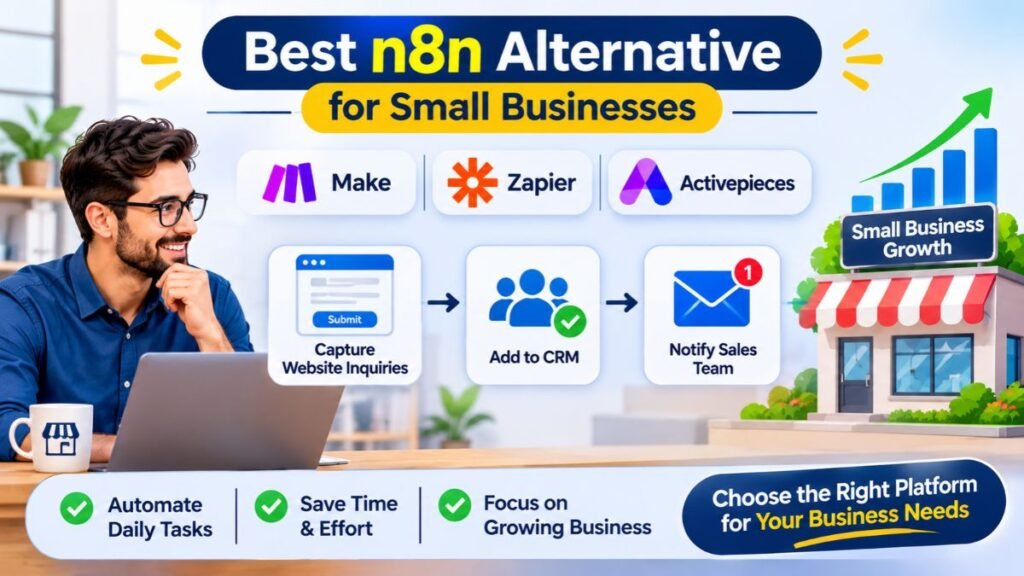
Consider a local service company that receives website inquiries. It could capture each form submission, add the contact to a CRM, and notify the sales team. The best platform is the one that performs these steps reliably without creating unnecessary maintenance or costs.
Best n8n Alternative for AI Agents
AI agents can interpret information and choose from available actions. This differs from a fixed workflow that always follows the same path. Gumloop and Lindy AI are relevant choices for teams exploring agent-based tasks. Relevance AI is another platform to investigate when building specialized business agents.
An AI agent might research a company, summarize its public information, and prepare a lead report. Human review should remain part of the process when decisions affect customers or business records. Strong agent orchestration also requires clear permissions, reliable data sources, and safeguards against incorrect outputs.
Best n8n Alternative for Developers
Developers often need more control than a basic no-code platform provides. Pipedream supports code-driven workflows and API connections. Node-RED offers a flexible flow-based environment for custom projects. Activepieces may also suit developers who want a visual builder with extensibility.
For example, a developer could receive a webhook, validate incoming data, call several APIs, and store the result. The ideal platform should support secure credentials, clear logs, reusable logic, and dependable retries. Test its development and production environments before committing.
Best n8n Alternative for Marketing Automation
Marketing workflows often connect forms, email platforms, analytics tools, and customer databases. Make and Zapier can automate routine campaign tasks and move information between applications. Gumloop may help when campaigns involve AI research, content classification, or lead enrichment.
A useful workflow might capture a new lead, check required fields, and assign the contact to a campaign. It could then notify a sales representative when the lead meets specific conditions. Good marketing automation should improve response times without sending irrelevant or duplicate messages.
Best n8n Alternative for CRM and Sales Automation
Sales teams need accurate contact records and timely follow-ups. Zapier and Make can connect forms, CRMs, calendars, and communication tools. Lindy AI may help with research and assistant-style tasks. Larger organizations may consider Workato or Tray.ai for complex integrations.
A lead generation workflow could collect a prospect’s details and create a CRM record. It might enrich the record, assign an owner, and schedule a follow-up reminder. Human approval is useful before sending personalized outreach or changing important customer information.
Best n8n Alternative for Enterprise Workflows
Large organizations often manage many applications, teams, and approval processes. Workato and Tray.ai are designed for enterprise integration requirements. Microsoft Power Automate can also fit organizations built around Microsoft applications. The right choice depends on existing systems, security policies, and operational complexity.
Enterprise workflows need more than connectors. Teams may require centralized administration, access controls, audit trails, and environment management. They should also review support agreements and regional hosting options. A successful platform must meet technical needs while supporting the organization’s governance model.
Best n8n Alternative for Self-Hosted Automation
Users who want to manage their own infrastructure should investigate Activepieces and Node-RED. Both can support self-managed deployment, although their setup and use cases differ. n8n itself remains a strong option for people comfortable operating its Community Edition.
Self-hosting is not automatically cheaper or safer. Server costs, maintenance time, backups, and security updates all matter. Before selecting a platform, estimate the resources required to keep workflows available. Also decide who will respond when an automation or server fails.
n8n Alternatives vs. n8n: Which Platform Is Better?
n8n remains a capable platform for users who want flexible automation and control. Its self-hosted option appeals to developers and technical teams. Its cloud plans also provide managed hosting for users who prefer less infrastructure work. The official pricing page currently lists plans based on monthly workflow executions.
However, other platforms may be easier for specific tasks. Zapier can simplify common app connections, while Make offers a visual scenario builder. Activepieces provides another option for open-source-oriented automation. The right decision depends on technical skills, required integrations, deployment preferences, and total cost.
n8n vs. Make
Make and n8n both provide visual workflow building. Make is often easier to approach when users want to connect applications through a visual scenario. n8n offers greater flexibility for custom logic and self-hosting. The best option depends on whether convenience or infrastructure control matters more.
Make uses credits to measure platform usage, while n8n counts complete workflow executions. This difference can affect costs for workflows with many steps. Make publishes a free plan and paid tiers, while n8n offers cloud plans and a self-hosted Community Edition. Compare both using a real workflow.
n8n vs. Zapier
Zapier is a strong choice for users who prioritize simple app connections. Its trigger-and-action structure makes many common automations easy to build. n8n provides more control over workflow logic, custom code, and hosting. Developers may prefer n8n when they need detailed customization.
The platforms also calculate usage differently. Zapier uses tasks, while n8n counts complete workflow executions. A multi-step process can therefore have different cost implications on each platform. Review the exact task limits and execution allowances before deciding.
n8n vs. Activepieces
Activepieces is a relevant n8n alternatives for users interested in open-source automation and AI features. It offers a visual builder and deployment choices. n8n has a mature ecosystem of nodes and a strong developer following. Both can suit users who want more control than basic no-code tools provide.
Compare their available integrations, deployment requirements, and licensing. Also check which features belong to the free edition and which require paid plans. The best choice may depend on whether you need AI agents, team governance, or straightforward self-hosted workflows.
n8n vs. Gumloop
Gumloop focuses on AI-powered workflows, while n8n supports a wider range of general automation patterns. Gumloop may suit teams building workflows around model-based research, extraction, and analysis. n8n may suit developers connecting APIs and business systems with custom logic.
The choice depends on the main job. If AI processing is central to the workflow, test Gumloop’s model and agent capabilities. If the workflow needs many custom integrations and deterministic steps, test n8n. Compare credit usage and model costs during the same trial period.
n8n vs. Pipedream
Pipedream is especially useful when developers want code and API access. It supports custom logic alongside prebuilt integrations. n8n offers a more visual approach while still supporting code-based customization. Both can handle event-driven workflows, but their development experiences differ.
Choose Pipedream when your team prefers working directly with code and APIs. Consider n8n when visual workflow management and self-hosting are important. Test authentication, error handling, logging, and deployment for the specific services you plan to connect.
When Should You Stay With n8n Instead of Switching?
Staying with n8n makes sense when existing workflows already work well. Your team may have invested time in custom nodes, credentials, and complex logic. Rebuilding everything elsewhere could introduce errors and consume valuable development time. A switch should solve a real problem, not simply follow a trend.
n8n is also worth keeping when self-hosting and customization are important. Its execution-based pricing can be attractive for workflows with many steps. The platform supports AI nodes, agents, and MCP-related features in its current plans. Review the latest plan limits before making a decision.
When Does Switching From n8n Make More Sense?
Switching may help when your team struggles with setup or maintenance. A managed platform can reduce infrastructure responsibilities. A simpler no-code platform may also help nontechnical employees create basic workflows. Another tool may provide a connector or AI capability that your current setup lacks.
However, test the replacement before migrating important processes. Recreate one workflow and compare its reliability, cost, and maintenance needs. Check whether the new platform supports equivalent data handling and error recovery. A controlled migration is safer than moving every automation at once.
How to Choose the Right n8n Alternative
Start with the business problem rather than the platform’s feature list. Identify the repetitive tasks that consume time and the applications involved. Then decide whether you need simple app connections, advanced logic, or AI-driven decisions. This approach narrows the n8n alternatives worth testing.
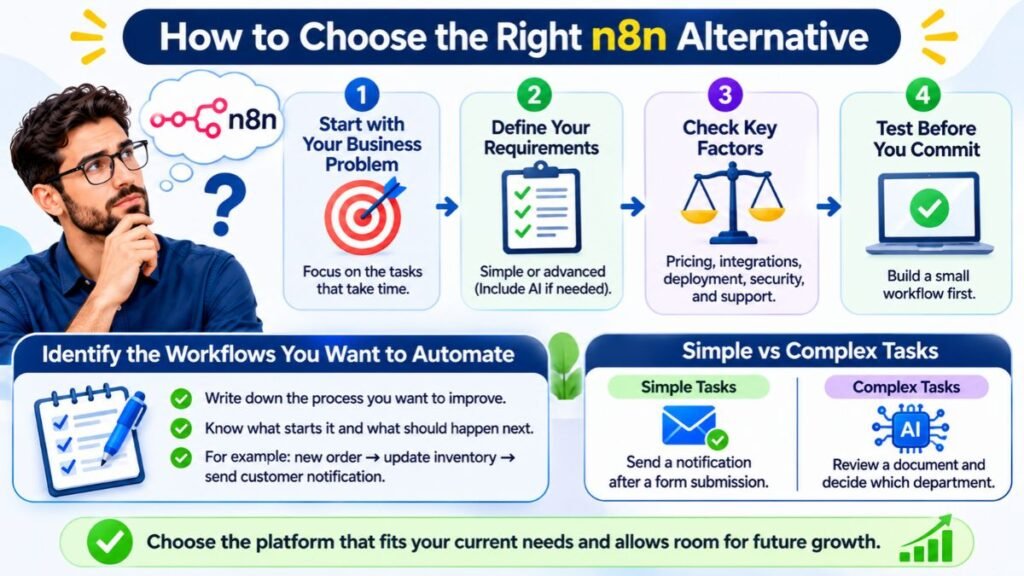
Next, evaluate the practical details. Check pricing, integrations, deployment, security, and support. Build a small test workflow before purchasing a long-term plan. The strongest choice should fit your current needs while leaving room for future growth.
Identify the Workflows You Want to Automate
Write down the process you want to improve. Identify what starts it, what information it uses, and what should happen next. For example, a new order might trigger an inventory update and customer notification. Clear requirements make platform comparisons more objective.
Also separate simple tasks from complex decisions. Sending a notification after a form submission needs basic automation. Reviewing a document and deciding which department should receive it may require AI. This distinction helps determine whether you need traditional workflow automation or AI capabilities.
Decide Between No-Code, Low-Code, and Code-First Automation
No-code tools help users build workflows without programming. Low-code platforms provide visual tools but allow custom code when needed. Code-first tools give developers more control over application logic. Each approach has trade-offs in flexibility, learning time, and maintenance.
A marketing employee may prefer Zapier or Make. A developer working with custom APIs may prefer Pipedream or n8n. A business exploring AI assistants may test Gumloop or Lindy AI. Choose an interface your team can maintain confidently.
Evaluate AI Features and Agent Capabilities
Do not choose an AI platform just because it advertises agents. Check what the agents can actually do, which models they support, and how they access business data. Understand whether the system can use tools, remember context, and recover from failed actions.
Some vendors describe agents as AI employees, but the label does not guarantee reliable independent work. Test the agent with real examples and measure accuracy. Require human approval before sending sensitive messages, changing financial records, or making important customer decisions.
Compare Pricing Beyond the Starting Subscription
A platform’s advertised starting price rarely tells the full story. Estimate monthly workflow runs, average steps, AI requests, and expected users. Check whether failed attempts and repeated actions consume additional usage. Also examine paid connector requirements and support costs.
The following table shows why pricing models need separate calculations.
| Pricing model | What it measures | What to check |
| Task-based | Individual actions or tasks | Actions per workflow |
| Credit-based | Platform-defined usage units | Credit cost per operation |
| Operation-based | Steps performed by a scenario | Loops and repeated operations |
| Execution-based | Complete workflow runs | Runs per month |
| User-based | Licensed users | Additional seats |
| Custom enterprise pricing | Negotiated usage and features | Contract and overage terms |
For example, n8n counts one complete workflow run as an execution, regardless of its number of steps. Make uses credits, while Zapier measures tasks. These differences can make a short workflow cheaper on one platform and a complex workflow cheaper on another.
Check Integrations and API Compatibility
Create a list of the applications your business already uses. Confirm that the platform supports them directly or through reliable APIs. Common examples include Google Sheets, Slack integration, Microsoft Teams, and Salesforce integration. Check the exact actions and triggers available for each connector.
A connector’s name alone does not prove it supports every required operation. You may need custom authentication, pagination, or webhook handling. Test the complete data flow before committing. Also check whether the platform supports the required API version and connection permissions.
Review Security, Privacy, and Hosting Options
Security should be part of the selection process from the beginning. Review how the platform stores credentials, protects data, and manages access. Businesses handling customer information should examine retention policies and subprocessors. They should also confirm whether the platform meets internal compliance requirements.
Larger teams may need SSO, role-based access control, and audit logs. Some organizations also require private networking or regional data hosting. Ask vendors for current security documentation rather than relying on general marketing claims. Make sure your chosen deployment matches your organization’s risk requirements.
Test the Platform Before Migrating
Start with a workflow that is useful but not business-critical. Recreate it in the alternative and test normal situations, missing data, and failed connections. Check whether the platform provides understandable error messages and execution history. Record the time needed to build and maintain the workflow.
Use the same sample data on each platform. Compare completion time, accuracy, cost, and reliability. Include an AI test if model-based processing is part of the requirement. This creates a fair comparison and reduces the chance of choosing based on appearance alone.
Plan Your Migration From n8n
A migration should begin with documentation. Record each workflow’s trigger, actions, credentials, data fields, and dependencies. Identify workflows that can be retired instead of rebuilt. This reduces unnecessary work and helps prevent old processes from being copied without review.
Move workflows in small groups and test each one before switching off the original. Keep a rollback plan for important business processes. Confirm that alerts, logs, and permissions work as expected. Only complete the migration after the replacement has performed reliably under normal operating conditions.
Frequently Asked Questions
Is there a better tool than n8n?
Yes. Make, Zapier, and Active pieces may be better depending on your needs, technical skills, and budget.
Is n8n becoming obsolete?
No. n8n remains relevant for AI automation, API integrations, and self-hosted workflows.
Is there a free version of n8n?
Yes. n8n offers a free self-hosted Community Edition, while its cloud plans are paid.
Does Microsoft have something similar to n8n?
Yes. Microsoft Power Automate provides workflow automation, app integrations, and business process automation.
What is Google’s equivalent to n8n?
Google AppSheet Automation and Google Cloud Workflows offer similar capabilities, although they serve different automation needs.
Conclusion
The best n8n alternatives depend on what you want to automate. Make offers a visual approach, Zapier simplifies common app connections, and Activepieces appeals to users interested in open-source flexibility. Pipedream suits developers, while Gumloop and Lindy AI focus more heavily on AI-driven tasks.
Enterprise teams may prefer Workato, Tray.ai, or Microsoft Power Automate for their specific integration environments. Node-RED remains useful for custom and device-focused projects. Compare the actual workflow, total usage cost, and maintenance requirements before making your choice. The right platform is the one your team can operate reliably.
Best Overall n8n Alternative
Make is a strong overall option for people who want visual automation without managing their own server. Its scenario builder supports multi-step workflows and a broad range of app connections. However, developers who need deep customization or self-hosting may still prefer n8n.
Best n8n Alternative for Beginners
Zapier is a practical starting point for beginners. Its trigger-and-action approach makes common tasks easier to understand. Users can connect popular applications without learning complex workflow logic. Check task limits before using it for high-volume processes.
Best n8n Alternative for AI Automation
Gumloop is worth testing when AI processing is central to your workflows. Lindy AI may suit teams that want assistants to handle recurring tasks. Compare both with Relevance AI if you need specialized agents or more advanced agent orchestration.
Best Free and Open-Source n8n Alternative
Activepieces is a strong option for users who want a business-focused visual builder and deployment flexibility. Node-RED is another choice for developers who prefer flow-based programming. Review licensing, hosting, and maintenance before selecting either platform.
Best n8n Alternative for Developers and Enterprises
Pipedream is a strong candidate for developer-focused API automation. Workato and Tray.ai are worth evaluating for complex enterprise integrations. Microsoft Power Automate may be the most natural fit for organizations already invested in Microsoft’s business ecosystem.
Ultimately, switching platforms should solve a real business problem. Test your most important workflow, calculate its expected cost, and review security before migrating. A carefully chosen automation platform can improve daily operations without adding unnecessary complexity.